

You may load fonts without a name which will simply load the font into the system registry and use its metadata.
See Font.
<configuration>
<resources>
<loadFont>
<fontFile>src/main/splasher/FreeMono.ttf</fontFile>
<name>font1</name>
</loadFont>
<loadFont>src/main/splasher/futurfont.otf</loadFont>
</resources>
<outputImageFile>image.png</outputImageFile>
<canvas>
<size>640x480</size>
<backgroundColor>WHITE</backgroundColor>
<draw>
<drawText>
<text>--> CENTER <--</text>
<textColor>BLACK</textColor>
<fontAntialias>HRGB</fontAntialias>
<fontName>font1</fontName>
<fontSize>48</fontSize>
<position>center,center</position>
</drawText>
<drawText>
<text>:Top Left:</text>
<textColor>#0000FF</textColor>
<fontName>Dialog</fontName>
<fontSize>48</fontSize>
<position>left,top</position>
</drawText>
<drawText>
<text>:Bottom Right:</text>
<textColor>255,0,0</textColor>
<fontName>futur</fontName>
<fontStyle>bold,italic</fontStyle>
<fontSize>32</fontSize>
<position>right,bottom</position>
</drawText>
</draw>
</canvas>
</configuration>Notice that you can map individual images using loadImage and explicitly set the name.
In this case we map the numbers 0 to 9 with loadAlphaNumImages using the num_small name prefix:
* Char 0 uses image name num_small0
We then load the '.' character using loadImage and map it to "num_small.".
We can then write any of these characters with images: 0123456789.
See drawImagesFromText.
<configuration>

    <resources>
        <loadAlphaNumImages>
            <directory>src/main/splasher</directory>
            <fileNamePattern>num_small%n.png</fileNamePattern>
            <ranges>0-9</ranges>
            <namePrefix>num_small</namePrefix>
        </loadAlphaNumImages>
        <loadImage>
            <imageFile>src/main/splasher/num_smallDOT.png</imageFile>
            <name>num_small.</name>
        </loadImage>
    </resources>

    <outputImageFile>image.png</outputImageFile>

    <canvas>
        <size>640x480</size>
        <backgroundColor>#E9E9E9</backgroundColor>
        <draw>
            <drawImagesFromText>
                <text>0123456789</text>
                <imageNamePrefix>num_small</imageNamePrefix>
                <alignment>VERTICAL</alignment>
                <padding>4</padding>
                <position>right,center</position>
            </drawImagesFromText>
            <drawImagesFromText>
                <text>3.0.0</text>
                <imageNamePrefix>num_small</imageNamePrefix>
                <alignment>HORIZONTAL</alignment>
                <padding>2</padding>
                <position>right-24,top+64</position>
            </drawImagesFromText>
            <drawImagesFromText>
                <text>1.2</text>
                <imageNamePrefix>num_small</imageNamePrefix>
                <alignment>HORIZONTAL</alignment>
                <padding>2</padding>
                <position>right-24,top+80</position>
            </drawImagesFromText>
        </draw>
    </canvas>

</configuration>Use the alpha attribute to set transparency, which is available for all drawables.
The transparency value in %, where 0 is completely transparent and 100 is opaque.
<configuration>
    <resources>
        <loadImage>
            <imageFile>src/main/splasher/crosshair.png</imageFile>
            <name>crosshair</name>
        </loadImage>
    </resources>
    <outputImageFile>image.png</outputImageFile>
    <canvas>
        <size>640x480</size>
        <backgroundColor>255,255,200</backgroundColor>
        <draw>
            <drawImage>
                <imageName>crosshair</imageName>
                <position>center,center-100</position>
                <alpha>25</alpha>
            </drawImage>
            <drawText>
                <text>Transparency</text>
                <textColor>255,0,0</textColor>
                <fontName>Dialog</fontName>
                <fontStyle>bold</fontStyle>
                <fontSize>28</fontSize>
                <position>left,bottom</position>
                <alpha>25</alpha>
            </drawText>
        </draw>
    </canvas>
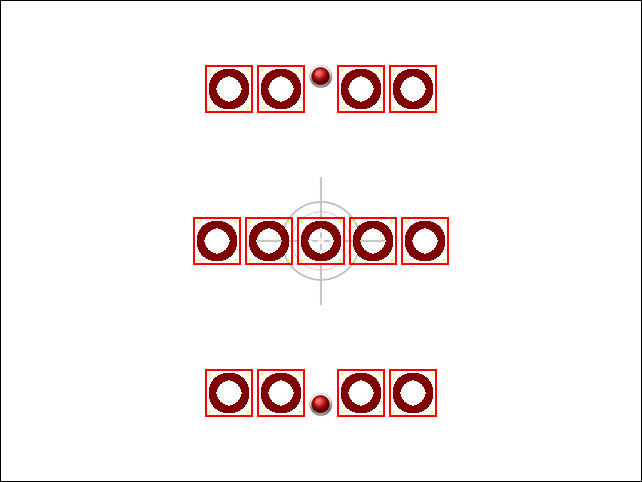
</configuration><configuration>
<resources>
<loadImage>
<imageFile>src/main/splasher/red-indicator.png</imageFile>
<name>indicator</name>
</loadImage>
<loadImage>
<imageFile>src/main/splasher/red_box.png</imageFile>
<name>redbox</name>
</loadImage>
<loadImage>
<imageFile>src/main/splasher/crosshair.png</imageFile>
<name>crosshair</name>
</loadImage>
</resources>
<outputImageFile>image.png</outputImageFile>
<canvas>
<size>640x480</size>
<backgroundColor>WHITE</backgroundColor>
<draw>
<drawImage>
<imageName>crosshair</imageName>
<position>center,center</position>
<alpha>25</alpha>
</drawImage>
<!-- normal -->
<flowLayout>
<padding>4</padding>
<position>center,center</position>
<draw>
<drawImage>
<imageName>redbox</imageName>
</drawImage>
<drawImage>
<imageName>redbox</imageName>
</drawImage>
<drawImage>
<imageName>redbox</imageName>
</drawImage>
<drawImage>
<imageName>redbox</imageName>
</drawImage>
<drawImage>
<imageName>redbox</imageName>
</drawImage>
</draw>
</flowLayout>
<!-- bottom -->
<flowLayout>
<padding>4</padding>
<position>center,bottom-64</position>
<draw>
<drawImage>
<imageName>redbox</imageName>
</drawImage>
<drawImage>
<imageName>redbox</imageName>
</drawImage>
<drawImage>
<imageName>indicator</imageName>
<position>center,bottom</position>
</drawImage>
<drawImage>
<imageName>redbox</imageName>
</drawImage>
<drawImage>
<imageName>redbox</imageName>
</drawImage>
</draw>
</flowLayout>
<!-- top -->
<flowLayout>
<padding>4</padding>
<position>center,top+64</position>
<draw>
<drawImage>
<imageName>redbox</imageName>
</drawImage>
<drawImage>
<imageName>redbox</imageName>
</drawImage>
<drawImage>
<imageName>indicator</imageName>
<position>center,top</position>
</drawImage>
<drawImage>
<imageName>redbox</imageName>
</drawImage>
<drawImage>
<imageName>redbox</imageName>
</drawImage>
</draw>
</flowLayout>
</draw>
</canvas>
</configuration>Result:
For usage, click here.